

O VMware Cloud Director 10.x possui um recurso muito interessante relacionado a garantia de sua disponibilidade e failover automático de seus serviços em caso de falhas.
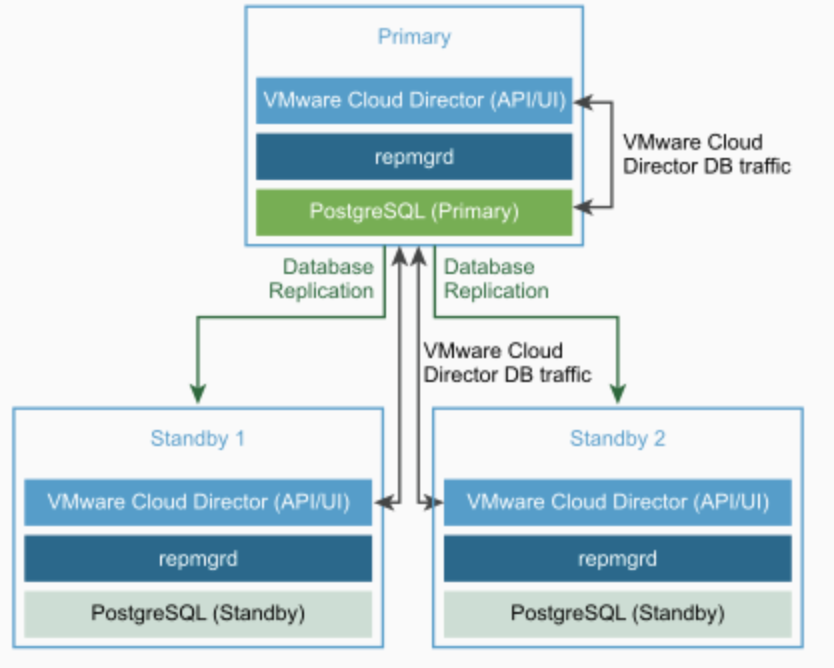
Uma arquitetura básica e com alta disponibilidade do VMware Cloud Director é composta por três appliances virtuais que também são chamados de células. Nessa arquitetura, cada célula é responsável por executar todos os serviços relacionados a aplicação, bem como os serviços de banco de dados. No entanto, uma das células recebe a função de célula primária e ela é a principal responsável pelas operações de escrita e leitura no banco de dados da solução. As demais células possuem réplicas dos dados e operam no modo read-only:
VMware Cloud Director Appliance Database HA Cluster
Por padrão, o modo de failover do vCD vem definido como Manual. Mas a partir da versão 10.x é possível alterar essa configuração através de APIs (iremos discutir sobre esse procedimento em posts futuros).
Com o modo de failover definido como automático, em caso de falhas na célula primárica, um processo de failover do banco de dados é automaticamente iniciado. Uma vez nesse cenário, é preciso que haja ao menos uma célula suadável no modo stand by para que a nova célula primária possa operar no modo escrita e leitura. Então é possível que o VMware Cloud Director funcione com apenas duas células, sendo uma delas ativa e a outra stand by, no entanto, é importante que uma terceira célula seja instanciada o mais breve possível, pois apesar de o sistema funcionar com apenas duas células, ele estará em um estado degradado.
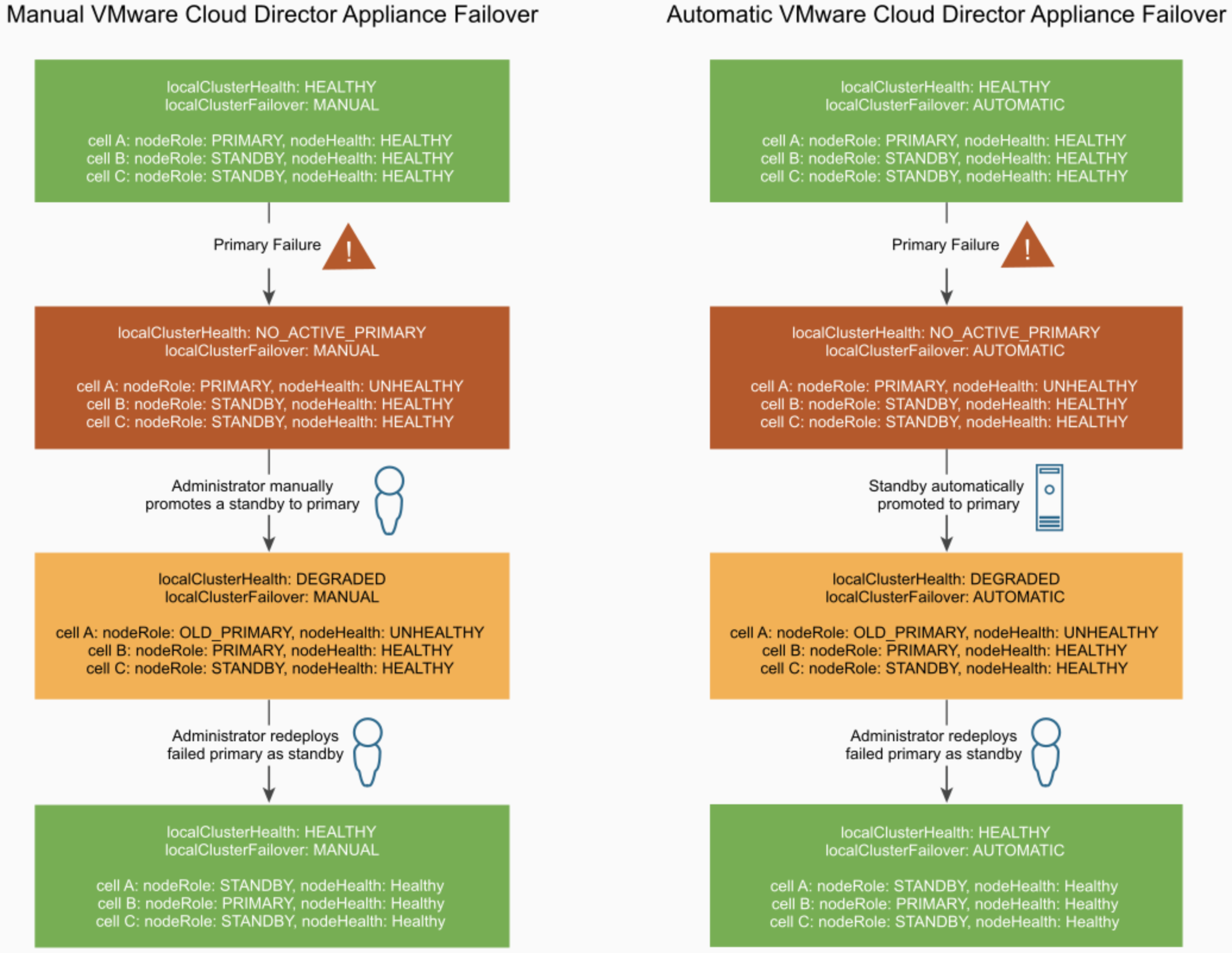
Abaixo é possível ver o status da solução de acordo com o número de células com falha:
Failover Manual e Automático do VMware Cloud Director Appliance
Muito Importante
É importante salientar que quando a célula primária do vCD sobre uma falha e fica indisponível, não é possível mais recuperá-la. Para que o sistema volte a um cenário totalmente saudável, com três células (uma ativa e duas stand by), é preciso instanciar uma nova célula que deverá operar no modo stand by. A antiga célula primária deverá ser removida do cluster PostgreSQL (iremos discutir sobre esse procedimento em posts futuros) e deletada no ambiente.
O vCD possui um mecanismo que coloca a antiga célula primária em um modo chamado halt mode. Então, por exemplo, se uma célula estiver operando no modo primário e por algum motivo ela ficar indisponível, uma célula stand by será promovida para célula primaria. Caso a antiga célula primária volte a responder no ambiente, o sistema irá automaticamente colocá-la no estado de halt, pois não é possível que duas células operem como células primárias. A célula antiga precisa então ser removida do ambiente.
Bem! Espero que esse artigo tenha sido útil. Por favor sintam se livre para entrar em contato caso tenham dúvidas ou crísticas construtivas. Todo feedback é bom!
VMware Cloud Director 10.x has a great feature that is related with its automatic failover in the event of primary cell database services failures.
A basic high available architecture of VMware Cloud Director solution is composed of three appliances that are usually called cells. In this architecture, each cell is responsible for executing all application and database services. However, one of the cell has the rule of primary one and it is the main responsible for writing and reading operations in the database. The other two cells have replica of data provided by the primary cell and operate the database in a read-only mode:
VMware Cloud Director Appliance Database HA Cluster
By default, the failover mode of vCD is set to manual. But in vCD 10.x is possible to configure it to be done automatically through APIs (we will cover this procedure in a future post).
With the failover mode set to automatic, in case of failures in primary cell database, a database failover is automatically initiated. Once in this scenario, there must be at least one active standby cell for the new primary database to be updatable. So it is important to clarify that in case of failures in the primary cell, the administrator needs to replace it as soon as possible. VMware vCloud Director can work fine with two healthy cells, but it was designed to have three.
You can see below the status of the system according with the number of cells with failures:
Manual and Automatic VMware Cloud Director Appliance Failover
Very Important
It is very important to know that when a primary vCD cell suffered failures and becomes unresponsive, it is not possible to recovery it. To return the environment to a healthy state with three cells (one primary and two stand by), once a stand by cell is promoted to primary, a new stand by cell needs to be deployed. So the old primary cell needs to be deleted and removed from PostgreSQL Cluster (we will cover how to do it in a future post), and a new one deployed.
vCD has a mechanism that put the old primary cell in a halt mode, so for example, if the current primary cell stop to respond because of a physical problem, a stand by cell is promoted to primary, and after some time the old primary cell starts to respond again, the system will put the old primary cell in a halt mode, once is not possible to have two primary cells in the environment. The old primary cell needs to be deleted and a new stand by one, deployed.
Well, I hope this article be useful. Please feel free to contact us in case of doubts or comment below. All feedback is great!
References:
 IT Stuffs