
É comum no nosso dia a dia nos depararmos com atividades que seriam realizadas muito mais rapidamente caso houvesse alguma automação para nos auxiliar. Em alguns casos é possível criar alguma automação usando scripts integrados as APIs ou CLIs dos sistemas em questão. No caso do NSX ALB não é diferente. Ele possui uma gama enorme de APIs que podem ser consumidas, além de uma interface de comando robusta que também pode ser usada nas atividades do dia a dia.
Recentemente me deparei com um caso em um cliente onde uma série de políticas HTTP (HTTP Policy Set) haviam sido configuradas em um Virtual Service e essas mesmas regras precisariam ser configuradas em um outro Virtual Service. Exatamente da mesma forma. Estávamos falando de mais de 100 políticas de requisição HTTP (HTTP Request Policies) que precisariam ser recriadas em um outro Virtual Service. Essa atividade levaria um tempo considerável se fosse feita de forma manual, mas consumindo as APIs do NSX ALB, ela foi concluída em minutos.
Nesse post gostaria de demonstrar como consumir as APIs do NSX ALB de uma forma fácil e rápida usando o Postman. Nesse repositório temos um Postman Collection que irá nos ajudar nessa atividade: Avi Networks. Você pode fazer o download da última coleção disponível, que até a publicação desse post é a versão 22.1.3. No próprio repositório existem os passos necessários para utilização da coleção, mas de forma objetiva, são eles:
- Faça o download e descompacte o arquivo zip;
- Abra o Postman e importe a coleção seguindo os passos do assistente de importação do Postman;
Para efetuar o login no NSX ALB através do Postman:
- Desabilite a verificação do certificado SSL no Postman: caso esteja usando um certificado auto-assinado no NSX ALB Controller, é importante que a verificação esteja desabilitada no Postman;
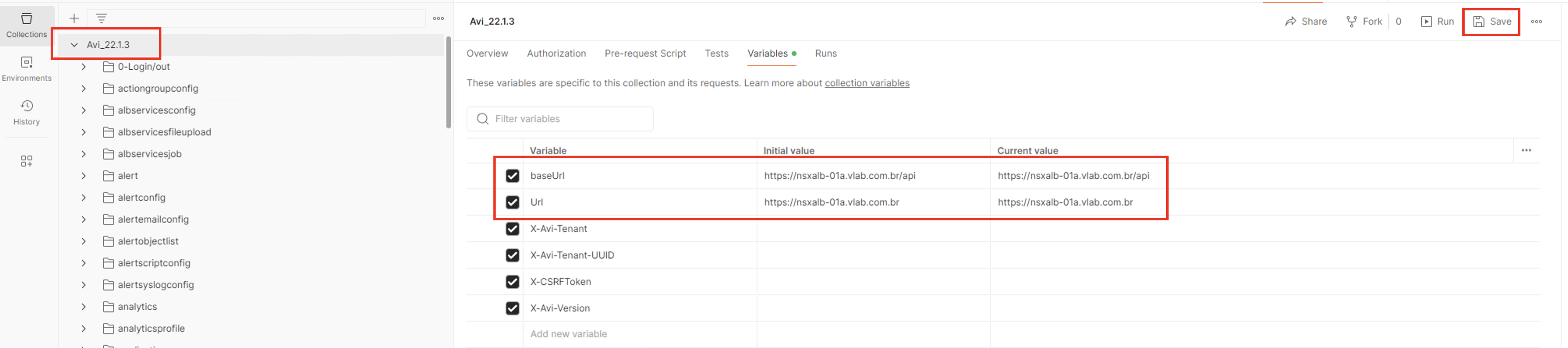
- Configure as variáveis globais: uma vez que você tenha importado a coleção do NSX ALB para o Postman, uma lista de APIs estará disponível. Você deverá clicar na pasta raíz, clicar em variáveis e alterar os campos baseUrl e Url (Current Value) com os endereços do seu NSX ALB. O campo X-CSRFToken deverá ser preenchido automaticamente durante a etapa de login;
- Login e obtenção do CSRFToken:
- Expanda o diretório 0-Login e clique em “Post Login” → Body → form-data → e digite nos campos username e password o usuário e senha de acesso ao NSX ALB.
- Clique em Send para enviar a requisição de Login e caso o login ocorrar com sucesso, o valor do campo X-CSRFToken deverá ser preenchido de forma automática na lista de variáveis globais.
- Caso não tenha sido preenchido de forma automática, você poderá ir até “Headers” → “Cookies” → “csrftoken”, na requisição de Post Login, copiar o CSRFToken e colcar no campo correspondente (Current Value) na lista de variáveis globais.
Uma vez que o comando Post Login tenha sido executado com sucesso, você já está logado no NSX ALB e pode usar qualquer comando na lista de APIs presentes nas coleções para o cumprimento de qualquer tarefa. Se você quiser obter uma lista de todos os Virtual Services presentes no ambiente, você pode executar um GET /virtualservice presente no diretório virtual service da lista de APIs da coleção, por exemplo:
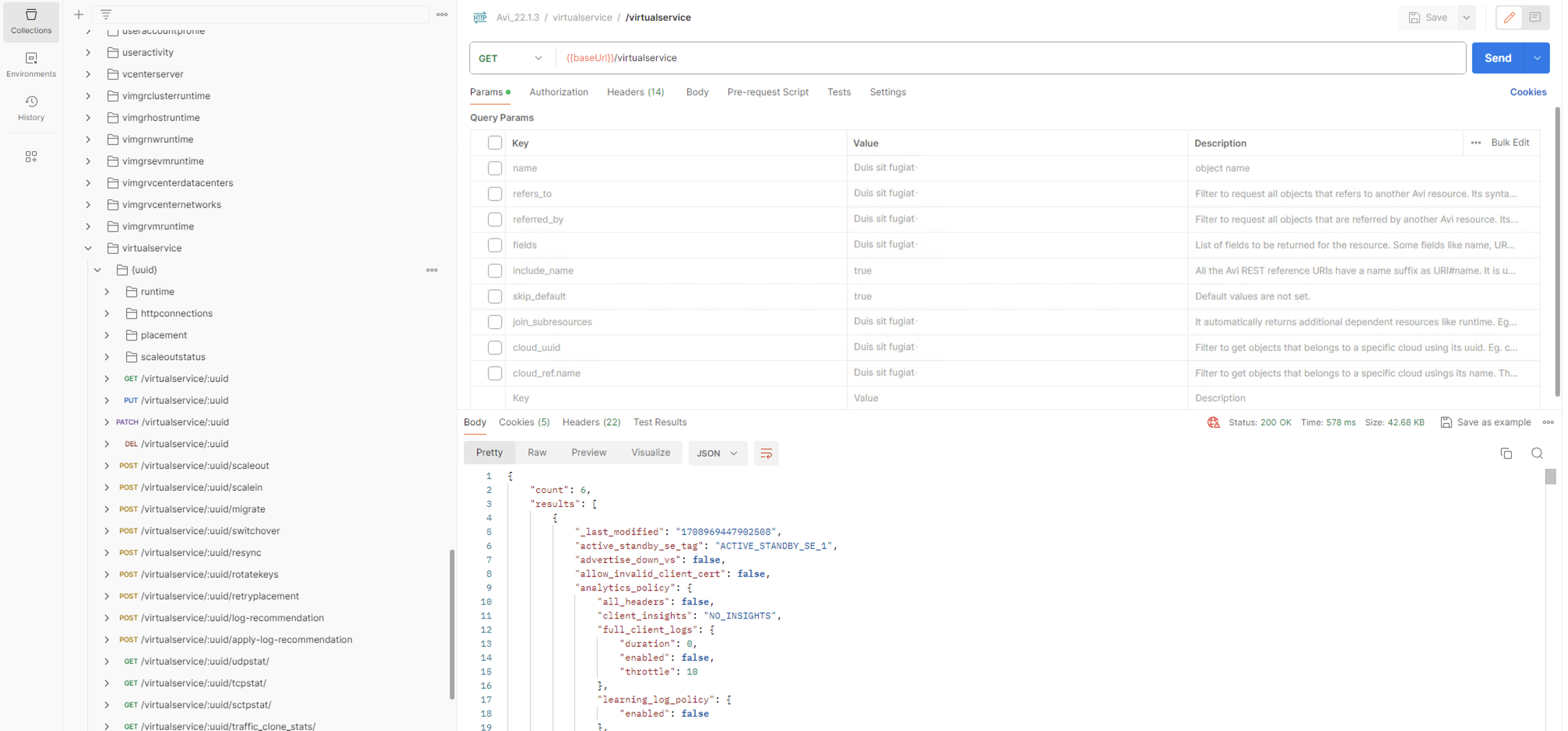
A lista de APIs é super completa e já vem com uma lista de Parâmetros que podem ser usados para aplicar filtros e refinar as pequisas.
E apenas para títulode curiosidade, eu usei as APIs presentes no diretório httppolicyset para obter o Policy Set do novo VS e aplicar as regras de HTTP Request do VS antigo no novo. No fim desse artigo irei deixar algumas referências da documentação de API do NSX ALB que poderá auxiliar na execução de atividades utilizando as APIs dele.
Espero que esse artigo tenha ajudado vocês, pessoal!!
Clique aqui para ler em Português
It is common in our daily lives to come across activities that would be carried out much faster if there were some automation to help us. In some cases it is possible to create some automation using scripts integrated into the APIs or CLIs of the systems in question. In the case of the NSX ALB it is no different. It has a huge range of APIs that can be consumed, as well as a robust command line interface that can also be used in day-to-day activities.
I recently came across a case in a customer where a series of HTTP policies (HTTP Policy Set) had been configured in a Virtual Service and these same rules would need to be configured in another Virtual Service. Exactly the same way. We were talking about more than 100 HTTP request policies that would need to be recreated in another Virtual Service. This activity would take considerable time if done manually, but by consuming the NSX ALB APIs, it was completed in minutes.
In this post I would like to demonstrate how to consume the NSX ALB APIs in an easy and quick way using Postman. In this repository we have a Postman Collection that will help us with this activity: Avi Networks. You can download the latest collection available, which at the time of publishing this post is version 22.1.3. In the repository itself there are the necessary steps to use the collection, but objectively, they are:
- Download and unzip the zip file;
- Open Postman and import the collection following the steps in the Postman import wizard;
To log in to the NSX ALB through Postman:
- Disable SSL certificate verification in Postman: if you are using a self-signed certificate in the NSX ALB Controller, it is important that verification is disabled in Postman;
- Configure global variables: once you have imported the NSX ALB collection into Postman, a list of APIs will be available. You must click on the root folder, click on variables and change the baseUrl and Url (Current Value) fields with the addresses of your NSX ALB. The X-CSRFToken field must be automatically filled in during the login stage;
- Login and obtain CSRFToken:
- Expand the 0-Login directory and click on “Post Login” → Body → form-data → and enter the username and password for accessing the NSX ALB in the username and password fields.
- Click Send to send the Login request and if the login is successful, the value of the X-CSRFToken field should be automatically filled in the list of global variables.
- If it has not been filled in automatically, you can go to “Headers” → “Cookies” → “csrftoken”, in the Post Login request, copy the CSRFToken and paste it in the corresponding field (Current Value) in the list of global variables.
Once the Post Login command has been executed successfully, you are already logged into the NSX ALB and can use any command from the list of APIs present in the collections to perform any task. If you want to get a list of all Virtual Services present in the environment, you can perform a GET /virtualservice present in the virtual service directory of the collection’s API list, for example:
The list of APIs is super complete and comes with a list of Parameters that can be used to apply filters and refine searches.
And just out of curiosity, I used the APIs present in the httppolicyset directory to obtain the Policy Set from the new VS and apply the HTTP Request rules from the old VS to the new one. At the end of this article I will leave some references to the NSX ALB API documentation that can assist in carrying out activities using its APIs.
I hope this article helped you guys!!
Referências / References
 IT Stuffs